使用API查询中国境内天气。
Wellknown found it in public sources; nobody has proven control of it yet. Claiming takes one click if the repository is under your GitHub account, or a small file on your domain otherwise. Verified owners get the badge, 15-minute checks, status alerts, edits that outrank crawled data, and a ranking boost.
Agents can do it too: POST https://wellknown.network/api/v1/claims with {"agent":"amapote-moni-mcp-server","method":"well_known_file"} — machine-readable steps at claim.json, guide at /docs/claim.
Everything here was measured by our prober or read from a registry. Nothing is self-reported.
Attributed to the source that supplied each field. Treated as claims, not facts.
# 中国城市天气查询 MCP 服务 基于高德地图 API 的中国城市天气查询 Model Context Protocol (MCP) 服务。该服务允许用户通过简单的请求获取中国各城市的实时天气状况和未来几天的天气预报。 ## 功能特点 - 使用高德地图天气 API 获取精确的中国城市天气数据 - 支持查询实时天气状况 - 支持查询未来 3-4 天的天气预报 - 支持智能城市名称识别,包括城市、区县级别的查询 - 支持城市名称搜索功能 - 实现为标准 MCP 服务,易于集成到 AI 应用中 ## 安装说明 ### 前提条件 - 高德地图开发者 API 密钥(需通过环境变量配置) ### 安装步骤 1. 克隆或下载本仓库 2. 进入项目目录 3. 使用 uv 安装依赖: ```bash uv venv source .venv/bin/activate uv add "mcp[cli]" httpx ``` ## 使用方法 ### 启动 MCP 服务 如果你需要自行创建客户端测试该 MCP 服务,请手动启动。 在终端中执行以下命令启动 MCP 服务: ```bash uv run weather.py ``` ### 使用集成的 MCP 服务 #### 在 Claude Desktop 中使用 如果想在 Claude Desktop 中使用,请添加服务器配置: 请在文本编辑器中打开 Claude for Desktop App 配置,路径参考如下 `~/Library/Application Support/Claude/claude_desktop_config.json` 如果文件不存在,请确保创建该文件。 ```python { "mcpServers": { "amap-weather-mcp-server": { "command": "uv", "args": [ "--directory", "/ABSOLUTE/PATH/TO/PARENT/FOLDER/weather", "run", "weather.py" ], "env": { "AMAP_API_KEY": "YOUR_API_KEY_HERE" } } } } ``` #### 在 Cherry Studio 中使用 如下图所示配置即可: 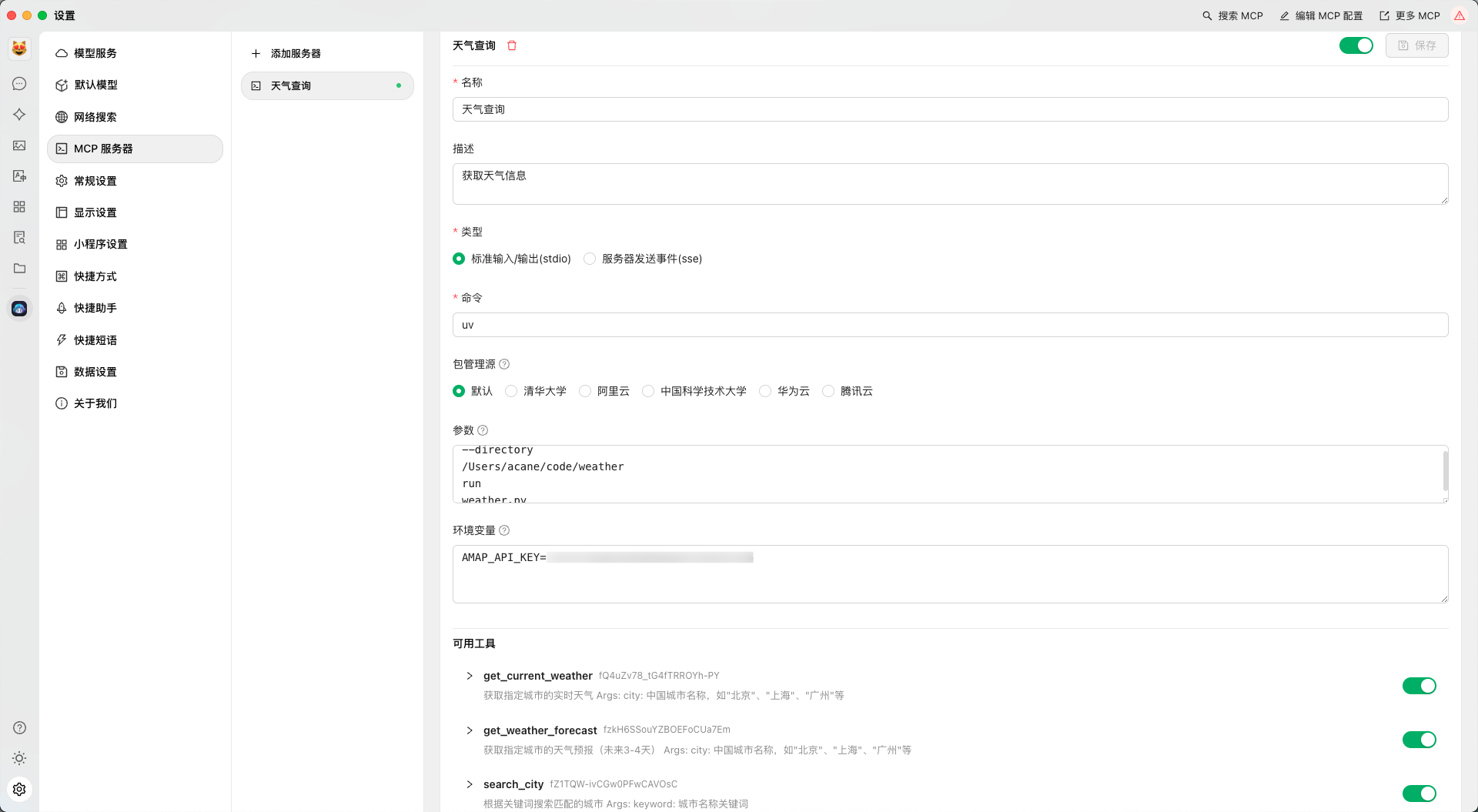 ### 调用服务 MCP 服务提供了三个主要工具函数用于天气查询: 1. `get_current_weather`: 获取城市当前天气状况 2. `get_weather_forecast`: 获取未来几天的天气预报 3. `search_city`: 搜索城市名称 使用 MCP 客户端调用示例: ```python from mcp.client import Client # 连接到服务 client = Client("amap-weather-mcp-server") # 查询实时天气 current_weather = await client.get_current_weather("北京市") print(current_weather) # 查询天气预报 forecast = await client.get_weather_forecast("上海市") print(forecast) # 搜索城市名称 cities = await client.search_city("广州") print(cities) ``` ## API 参考 ### get_current_weather 获取指定城市的实时天气数据。 **参数:** - `city`: 中国城市名称,需要包含省/市/县等行政区划标识,如"北京市"、"上海市"、"海珠区"等 **返回:** 格式化的城市实时天气信息字符串,包括: - 城市名称 - 天气状况 - 温度 - 风向 - 风力 - 湿度 - 发布时间 ### get_weather_forecast 获取指定城市的天气预报(未来3-4天)。 **参数:** - `city`…
Mapped onto the structured taxonomy from declared text and observed tool names. Confidence shown for derived entries.
Every source is kept verbatim. Field changes are logged as events.