MORX GMS2 MCP: GameMaker authoring, isolated runs and runtime observation over stdio
Wellknown found it in public sources; nobody has proven control of it yet. Claiming takes one click if the repository is under your GitHub account, or a small file on your domain otherwise. Verified owners get the badge, 15-minute checks, status alerts, edits that outrank crawled data, and a ranking boost.
Agents can do it too: POST https://wellknown.network/api/v1/claims with {"agent":"morx-gms2-mcp","method":"well_known_file"} — machine-readable steps at claim.json, guide at /docs/claim.
Everything here was measured by our prober or read from a registry. Nothing is self-reported.
Attributed to the source that supplied each field. Treated as claims, not facts.
<div align="center"> # MORX GMS2 MCP **从编辑项目,到看见运行结果。** 让 AI 助手编写 GML、运行游戏、查看画面,并根据结果继续调整。 *GameMaker tools for AI agents · Local stdio MCP* [](https://github.com/MKTLMORX/morx-gms2-mcp/actions/workflows/tests.yml) [](https://pypi.org/project/morx-gms2-mcp/) [](https://github.com/MKTLMORX/morx-gms2-mcp/blob/main/pyproject.toml) [](#适用范围) [](https://github.com/MKTLMORX/morx-gms2-mcp/blob/main/LICENSE) [快速开始](#快速开始) · [运行游戏](#运行游戏) · [工具与用法](https://github.com/MKTLMORX/morx-gms2-mcp/blob/main/docs/reference.md) · [更新记录](https://github.com/MKTLMORX/morx-gms2-mcp/blob/main/CHANGELOG.md) </div> 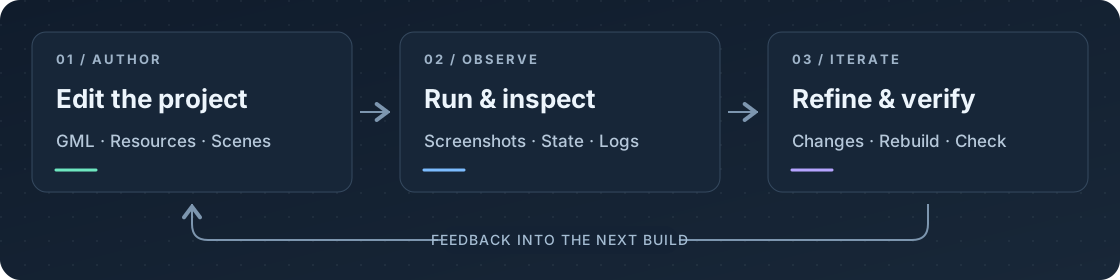 ## 功能 58 个工具,覆盖项目制作与运行检查。支持 Codex、Claude Code 等本地 MCP 客户端。 | 领域 | 支持的操作 | | --- | --- | | **运行与检查** | 编译运行独立副本,查看截图和日志,读写变量,模拟键鼠交互 | | **代码与场景** | 读写 GML,创建脚本、物体、事件、房间、实例和瓦片图层 | | **美术与音频** | 导入 PNG、WAV/OGG、字体;编辑精灵;配置声音压缩、流式播放和音频组 | | **显示与资源** | 配置窗口、相机和视口;整理分组、重命名及删除资源 | | **修改与恢复** | 预览变更、检测冲突、保存备份并撤销 | ## 快速开始 需要 **Windows、Python 3.10+**、已在 GameMaker 中创建并保存的项目,以及支持本地 stdio 的 MCP 客户端。以下命令使用 PowerShell。 ### 1. 安装并绑定项目 在用于存放 MCP 的目录执行,将项目路径替换为自己的路径: ```powershell python -m venv .venv $mcpPython = (Resolve-Path '.venv\Scripts\python.exe').Path & $mcpPython -m pip install morx-gms2-mcp $gameProject = 'D:\Games\MyGame' & $mcpPython -m morx_gms2_mcp bind --project $gameProject & $mcpPython -m morx_gms2_mcp check --project $gameProject ``` `--proje…
Mapped onto the structured taxonomy from declared text and observed tool names. Confidence shown for derived entries.
Every source is kept verbatim. Field changes are logged as events.