Cross-platform MCP server exposing tools to list and kill OS processes
Listed on its own since 2026-09-24. Until then it was part of misiektoja-kill-process-mcp, where its earlier checks remain.
Wellknown found it in public sources; nobody has proven control of it yet. Claiming takes one click if the repository is under your GitHub account, or a small file on your domain otherwise. Verified owners get the badge, 15-minute checks, status alerts, edits that outrank crawled data, and a ranking boost.
Agents can do it too: POST https://wellknown.network/api/v1/claims with {"agent":"kill-process-mcp","method":"well_known_file"} — machine-readable steps at claim.json, guide at /docs/claim.
Everything here was measured by our prober or read from a registry. Nothing is self-reported.
Attributed to the source that supplied each field. Treated as claims, not facts.
# kill-process-mcp 🔫 Cross-platform **MCP** (Model Context Protocol) server exposing tools to **list and kill OS processes** via natural language queries. Perfect for shy ninjas who just want rogue processes gone! > **"Find and nuke the damn CPU glutton choking my system!"** <a href="https://glama.ai/mcp/servers/@misiektoja/kill-process-mcp"> <img width="380" height="200" src="https://glama.ai/mcp/servers/@misiektoja/kill-process-mcp/badge" alt="kill-process-mcp MCP server" /> </a> <a id="demo"></a> ## Demo 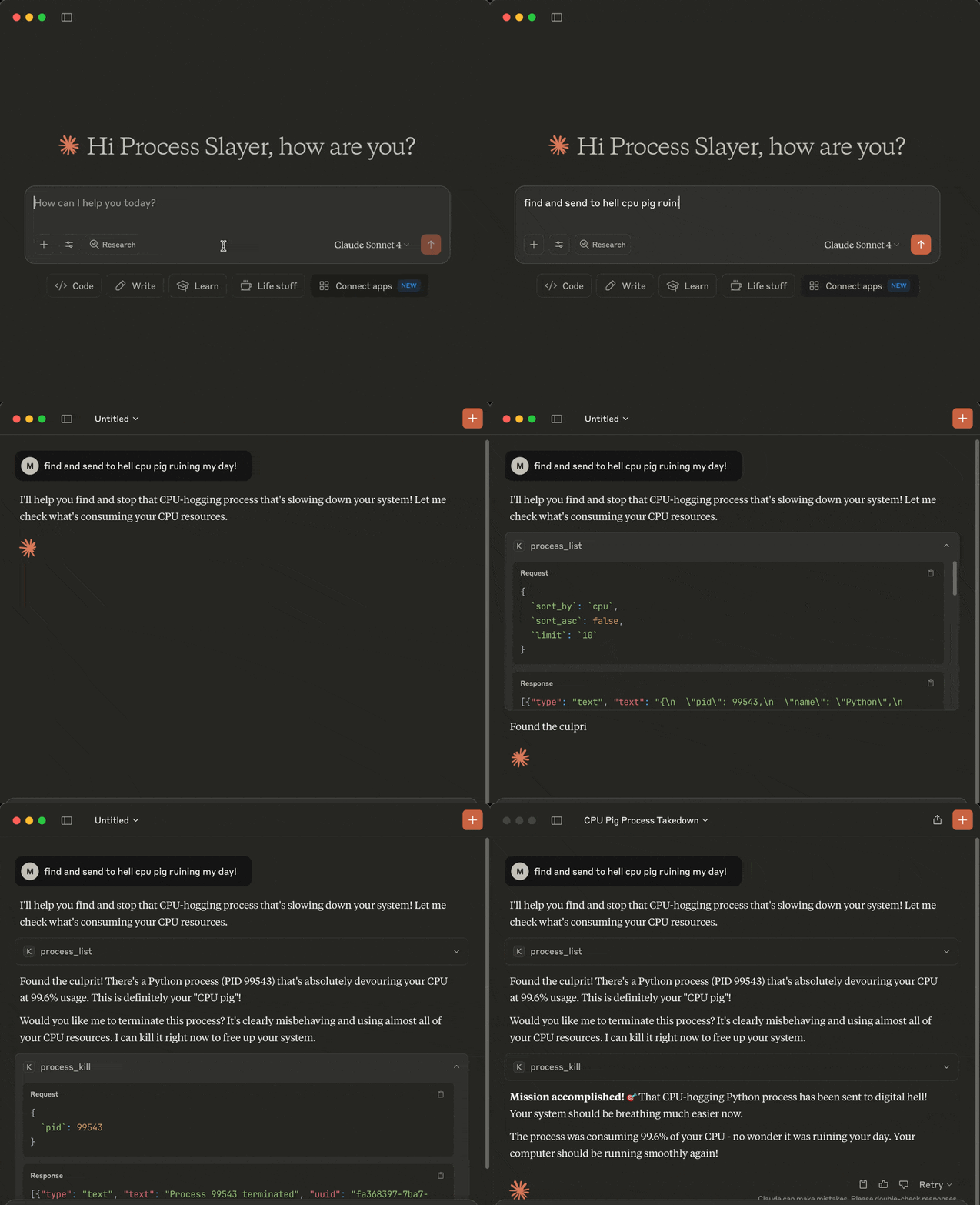 <a id="tools"></a> ## Tools The following tools are exposed to MCP clients: - `process_list`: Lists running processes sorted by CPU or memory with optional name, user, status, CPU/memory thresholds, system-process filtering, sort order and limit - `process_kill`: Terminates the selected process (with extreme prejudice!) <a id="requirements"></a> ## Requirements * MCP-compatible LLM client (like [Claude Desktop](https://claude.ai/download) or [Cursor](https://cursor.com)) * OS: macOS/Windows/Linux * Python 3.13 or higher * [uv](https://github.com/astral-sh/uv) * Libraries: `mcp` `psutil` <a id="installation"></a> ## Installation You can install `kill-process-mcp` in two ways: 1. **Preferred:** use `uvx` - no cloning or setup needed. 2. **Alternative:** clone the repo and set up manually. --- <a id="1-install-uv-required-for-both-methods"></a> ### 1. Install uv (required for both methods) Install [uv](https://github.com/astral-sh/uv) if missing: ```sh pip install uv # or on macOS: brew install uv ``` In case of the preferred `uvx` method you can now [configure your MCP client](#3-configure-mcp-client) (skip the cloning step below). <a id="2-clone-the-repo-and-install-only-required-for-alternative-mode-skip-for-uvx"></a> ### 2. Clone the repo and install (only required for alternative mode, skip for uvx)…
Mapped onto the structured taxonomy from declared text and observed tool names. Confidence shown for derived entries.
Every source is kept verbatim. Field changes are logged as events.